
Many PDM and PLM systems can store production files. Upload A.dxf, and the server records an A.dxf item. At first glance, file management appears complete. Yet if that record contributes little beyond a file path, its value to production efficiency, BOM completeness and file relationships is close to zero.
The more important question is where the file comes from. Production files are not independent objects. A drawing comes from a part; PDF, DXF and other flat outputs come from the drawing; model exports also come from the part. Recording only a creation time or version-update time can create the illusion of traceability without explaining which material the file belongs to, why it exists, or where it should be regenerated.
What an A.dxf record actually contributes
Once A.dxf is stored on a server, its most immediate value is simply knowing where it is. It does not determine the production type, complete the BOM, or establish relationships between files. Timestamps and versions may look useful, but when drawings and model exports are both refreshed from the part, those fields describe the timing of a result rather than the data relationship itself.
The real objective is not to store more files. It is to find every production file for a material from one authoritative data source.
Move from file records to data-source search
A stronger approach keeps the material’s stable code in the design data source, and a retrieval routine uses that code to find A.dxf. The source lives in the BOM table. When the BOM changes, the search result changes with it.
Globally, A.dxf, A.pdf, A.stp, A.sldprt and A.slddrw all represent the same material. Creating a separate global key for every file format manages technical artifacts rather than the real material. Removing those redundant keys produces a simpler and more reliable structure.
More importantly, a change to the single data source can then propagate through the whole production-file chain. That is the prerequisite for automated output and downstream distribution.
SWTDO’s two-level index
SWTDO calls this process a two-level index. The first level is the data-table record. The second level is code-driven file retrieval based on that record. The record expresses the business relationship; the code turns that relationship into an actual set of files.
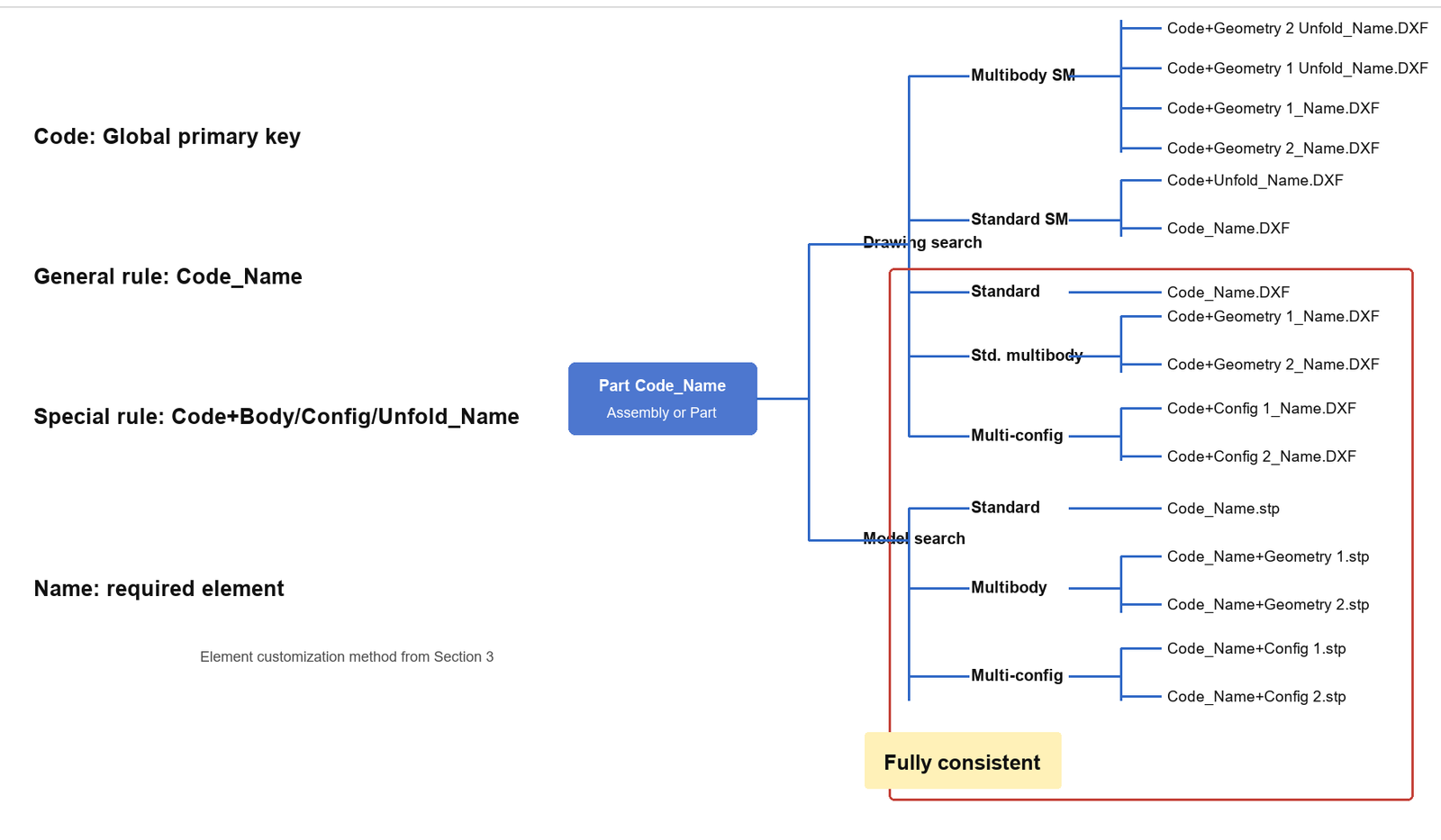
Naming uses Code_Name. Code is the global primary key, while Name makes the file recognizable to people. Because the global key already guarantees uniqueness, routine retrieval does not need Ver. Version data can remain as a historical snapshot, but it should not continue to act as the primary index.
Version control still has a role, just not as the main index
Legacy customer support genuinely needs history. Suppose a CQ cylinder shipped ten years ago has gone through multiple engineering improvements. To replace a part today, the team must trace the sales record to the drawing revision used at that time and then locate every related part. The sales event behaves like a Fork node that can be rolled back.
That scenario is different from everyday retrieval. Routine production files should be found through the single data source and global key. Only contracts, maintenance history or old-project snapshots need to return to a prior version. Making the exception the system-wide primary index forces every ordinary task to carry the cost of version control.
Naming extensions for multibody, configuration and sheet-metal flat patterns
The second-level index can remain simple: different extensions, same filename body.
Code_Name.sldprt → Code_Name.slddrw → Code_Name.dxfCode_Name.sldprt → Code_Name.stp
Multibody and configuration cases establish a relationship between the file and its host. Sheet metal adds a dedicated flat-pattern output, so the name becomes Code+Body_Name.slddrw. Use fixed separators, + and _, and avoid spaces. The naming remains stable for English and Japanese users and sorts predictably in Prod and Windows Explorer.
Stable sorting also matters. When files can be sorted consistently, teams do not need to rebuild a query every time. A fixed server-side order is often simpler than a complicated search view.
The result is a linked production-file chain
After design changes the BOM, the system can obtain the complete production-file set from that BOM and distribute it. Purchasing, assembly and other downstream teams can retrieve the material they need from the client once permissions are granted. The point is not another disconnected file list. The BOM, file retrieval, permissions and production output all share the same data relationships.
Further reading: How to Design an Industrial BOM, Upstream and Downstream File Formats, and SWTDO ProdSys.