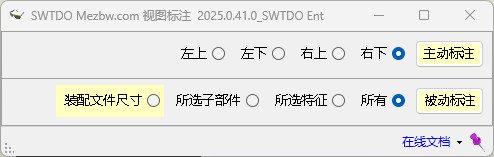
Multi-select support: In drawing, supports single view selection or no selection.
Supports line/face selection in drawing; its effect needs to be experienced.
Graphic Entities
This concept originates from the SW CSWP manual, roughly meaning all entities (lines, points) or closed regions (faces) in a drawing.
Active Dim for Automatic Dimensioning
TDO drawings support 2 types of automatic dimensioning.
Active Dim: Dimensions are created by code based on lines/points in drawing views.
Disadvantage: Compared to Passive Dim, the code cannot analyze duplicate dimensions across multiple views, nor determine which dimensions are necessary.
Advantage: Passive Dim can provide some assistance for parts without design intent, such as STEP files.
Passive Dim for Automatic Dimensioning
Passive Dim: Fully based on the designer’s intent in the part/assembly drawing, such as length/width/height in part drawings and distance mates in assembly drawings.
Advantages: The dimensioning method defined by the designer in the part drawing becomes the Passive Dim dimensions, including tolerances and annotations, fully reflecting design intent. Capable of automatically analyzing duplicate dimensions across three standard views.
Disadvantages: When there are no design intent dimensions in the component (e.g., STEP files), Passive Dim does nothing at all. When the drawing is of a solid model, the designer’s intent is typically associated with the part; for solid model drawings, Passive Dim will show many over-defined dimensions (though these still represent the designer’s intent).
Create3Views vs. View Dim: Differences
1. Create3Views: Uses both Active and Passive methods for automatic dimensioning. For multi-body parts, the first view uses Passive Dim, others use Active Dim. 2. View Dim: Offers greater selection flexibility and supports various Active and Passive settings.