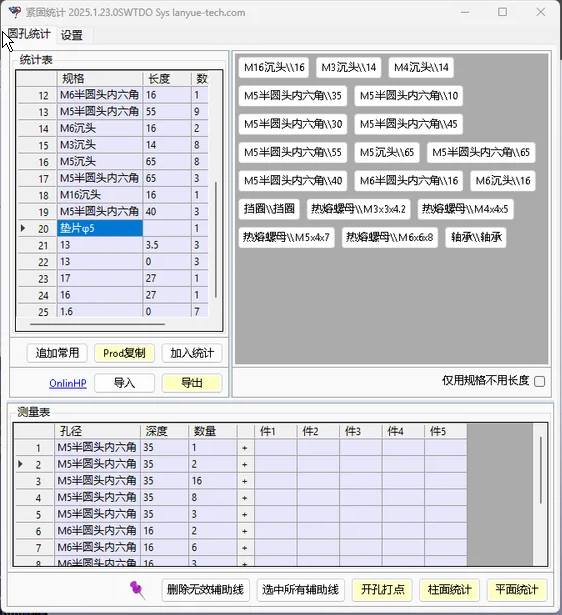
Select the fasteners required by the design from the specifications available on the server. Specifications not present on the server are added automatically without administrator involvement.
bilibli
https://www.bilibili.com/video/BV1SVqfBuEQs
https://www.douyin.com/video/7414557129350155531
https://www.douyin.com/video/7414951806830169356
https://www.douyin.com/video/7415650811524435210
Introduction:
BoltStats counts bolts when no bolt fasteners exist, using hole-type detection and semi-manual designation. The scope includes circular holes, tapered holes, and straight-slot holes without chamfers.
Part A has 10 holes; Part B has 3 holes.
At most, how many fastener sets does the result contain? 3 sets.
Key points:
BoltStats is not related to the total number of holes.
It depends on the number of concentric holes.
BoltStats divides connecting components into two categories: fasteners (bolts and screws) and Fastener Acc (nuts and washers).
For fasteners, length is the critical dimension.
For Fastener Acc, thickness is the critical dimension.
There are only two hole types: through holes and blind holes. Only these two types change the bolt-length calculation method, through length extension and length reduction respectively.
Blind hole: the bolt length must be <= the total hole length.
Through hole: the bolt length must be > the total hole length.
Regardless of hole type, adding a bolt accessory always increases the bolt length (which is why thickness is the critical dimension for Fastener Acc).
Equal-Length Guide Line Selection:
BoltStats creates a TDO feature 3D sketch. You may need to know where an M5 pan-head Phillips screw is installed. Equal-Length Guide Line Selection helps you identify the bolt’s installation location.
What is length deviation?
Note that guide line lengths and the bolt lengths in the table are not necessarily identical. They match only at the moment the count is completed.
Once washers or nuts are added, the dimensions in the table change.
A nut is 5 mm thick. To locate a 13 mm hole, the table value is 13 + 5 = 18, so the deviation is 5. In other words, equal-length guide lines in the range from 18 – 5 to 18 + 5 are all selected.
How does that help locate the position if it is not precise? Correct.
Remember that you are a person, not a machine. The purpose of this operation is to narrow the inspection range. Once the approximate hole area is identified, you can determine the exact position more easily.
Ideally, use Equal-Length Guide Line Selection before applying length extension or length reduction.

Equal-Length Guide Line Selection
A guide line represents the original hole depth and does not account for accessory thickness. Once you add the thickness of accessories to the bolt length, the actual bolt length will necessarily differ from the guide line length.
This is the concept of the tolerance range.
For example, take an M5-16 mounted at the top of an enclosure. If there is a guide line of length 14, a 3 mm tolerance lets you select a 14 mm TDO feature line.
A good design will always try to unify bolt specifications as much as possible.
We do not need an absolutely precise position; an approximate location is sufficient for finding bolts.
This command requires the 3D lines from the TDO feature guide lines to remain. In SW, hiding the sketch does not affect our work.
Add Calculation Allowance
For example, if the hole depth is 10, the washer is 0.8, and the nut is 4 mm, the total is 14.8, but the bolt length must protrude 2 mm. This 2 mm is the bolt allowance.
Adding an allowance supports mathematical expressions.
Fit to Standard Lengths
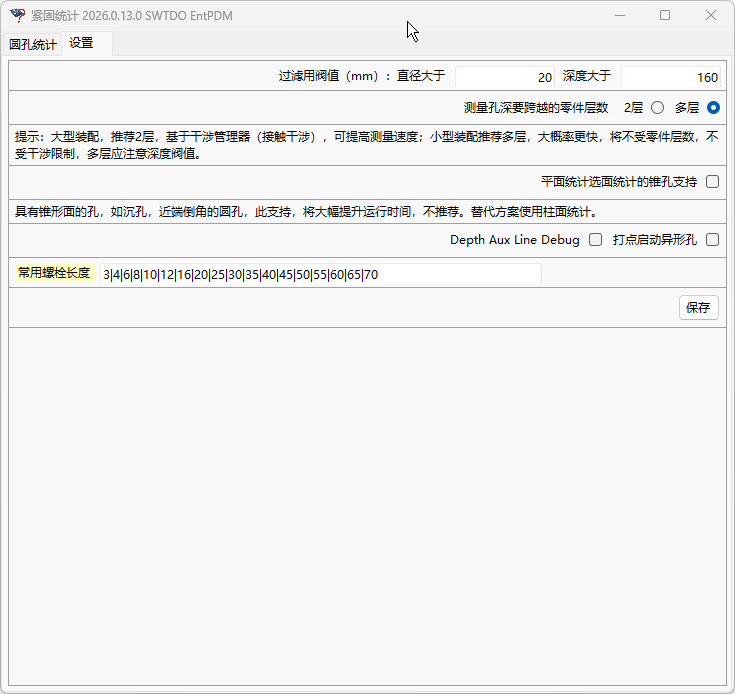
In the example above, the calculated result is 16.8. A 16.8 mm bolt is not available, but a 20 mm bolt is. Based on the standard length presets in Settings, this command can fit the length to 20.
A blind hole always requires a shorter length.
A through hole always requires a longer length.
Basic Operations
- Cylindrical-surface counting; mark points at openings as guided by the interface
- Planar-surface counting; supports counting multiple selected surfaces or counting with no surface selected
Basic workflow: select faces to count → add to count; select faces to count → add to count, repeating as needed.
After all counting is complete, specify the fastener and Fastener Acc types.
Excel Import/Export
Export is equivalent to a temporary staging process.
Import can retrieve staged accessories and can also apply an existing definition format for common components.
Combo Technique
The Prod copy command can enter fastener information into ProdSys.
Fastener Library Search [Enterprise Data Entry]
When the interface is Local, use the local repository; when the interface is Ent, use the Enterprise Library.
If the user has write permission, newly added bolts are saved to the Enterprise Library (built together by all users).
Fastener information written to the Enterprise Library retains the employee ID.